Preferences
The Tools → Preferences pull-down menu opens this dialog, focused on on the handling of a few user preferences.
It operates at a much higher level than the direct handling of application constants.
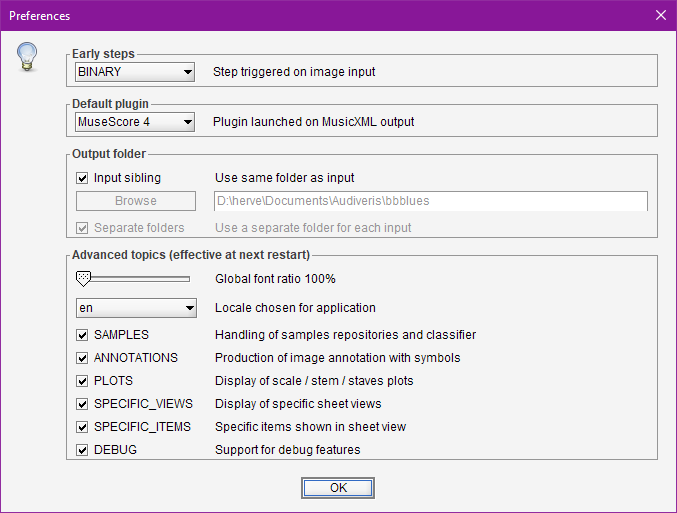
Beside standard features, the dialog also presents a set of advanced features that impact the Audiveris user interface and thus require an application restart.
Table of contents
- Standard processing options
- Early steps
- Default plugin
- Output folder
- Global font ratio
- Locale
- Advanced options
Standard processing options
updated for 5.10
These options impact the way the engine can work, especially for demanding scores.
-
The SWAPPED_SHEETS option determines whether the engine should save a sheet to disk and then remove it from memory after processing.
This is particularly useful when transcribing a book with many sheets, as it keeps memory consumption low without significantly impacting the overall transcription time.
This option is enabled by default. -
The PARALLEL_SYSTEMS option determines whether the engine should process all the systems for a sheet in parallel.
This only applies to the steps where parallelizing the systems is relevant, which is 13 of the 20 defined steps. The overall transcription time saving is approximately 25%.
A drawback of this approach is that the results are not strictly reproducible, since the systems compete for allocating and naming entities like Inter instances.
This option is disabled by default. -
The MULTIPLE_DELETE option determines whether the user can delete several Inters without confirmation.
This option is disabled by default.
Early steps
This box allows to define which step is automatically trigerred on an input file.
Default plugin
This allows to interactively choose a new default plugin among the declared ones, since by default the first declared plugin is set as the default one (See the Plugins section).
Output folder
These boxes govern where output files are located by default.
- Input sibling: If set, all outputs are stored in the same folder as the input file (unless the
-outputoption is specified on the command line). - Browse: Allows to define a default output folder.
- Separate folders: If set, all outputs related to a given input file are stored in a separate folder, created according to the input file name without its extension.
For further explanations, see the section on Standard folders.
Global font ratio
The slider allows to select a larger font size used throughout the application views.
The new ratio is applied at the next restart.
Locale
We can pick up a different user language.
As of this writing, the available locales are:
- en (English), the default
- fr (French), not yet fully implemented…1
The new locale is applied at the next restart.
Advanced options
Each of these options can gather several related features.
- SAMPLES deals with sample repositories and classifier training.
- ANNOTATIONS deals with the production of symbol annotations.
- PLOTS deals with the display of plots for scale, stem, staff or header projections.
- SPECIFIC_VIEWS deals with specific sheet tabs (staff free, staff-line glyphs).
- SPECIFIC_ITEMS deals with the display of specific items on views (attachments, glyph axis, …)
- DEBUG deals with many debug features (notably browsing the book internal hierarchy).
An application restart is needed to take any modified selection into account.
-
If you are willing to add another locale, please post a message on the Audiveris discussion forum. ↩