Inter board
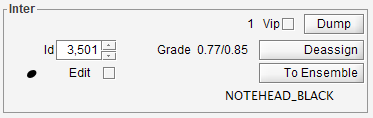
Table of contents
- Vip
- Dump
- Id
- Grade
- Deassign
- (shape icon)
- Edit
- To Ensemble
- (shape name)
- (word)
- (sentence)
- (sentence role)
- (lyrics)
Vip
(input/output)
Flag this entity as VIP, resulting in verbose processing information when entity is involved.
Dump
(input)
Dump main entity data into the log window.
Id
(input/output)
Integer ID of entity.
Grade
(output)
The intrinsic grade value assigned to the Inter instance. Followed by the computed contextual grade, if any.
Deassign
(input)
Button available to manually delete this interpretation.
(shape icon)
(output)
If available, the icon related to the Inter shape.
Edit
(input/output) Allows to open an editor of the entity.
To Ensemble
Button to navigate to the ensemble if any this entity is part of.
(shape name)
(output)
Name of the shape assigned to the Inter instance.
(word)
(input/output)
For a word inter, the modifiable word textual content.
(sentence)
(output)
For a sentence inter, the non-modifiable sentence textual content.
Except for the Metronome case, the modifications of a sentence textual content can be performed only at the word level.
(sentence role)
(input/output)
Role of the sentence (such as Direction, PartName, Rights, Lyrics, …).
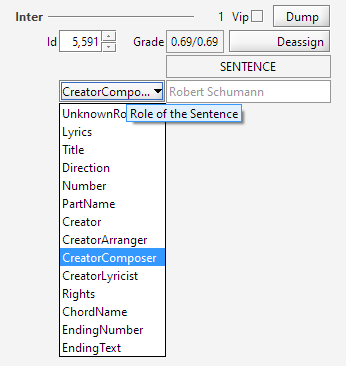
Nota: The Lyrics and Metronome sentence roles are so specific that when they are changed, a new inter instance is transparently created to replace the previous one.
(lyrics)
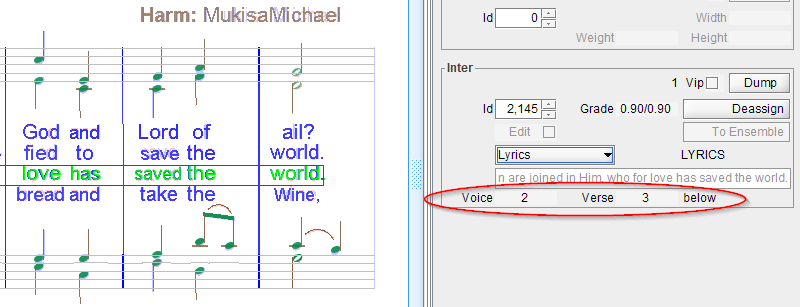
For a lyrics sentence, the inter board displays additional data:
- Voice number,
- Verse number,
- Location with respect to staff.